 ESPEC North America, Inc. (Corporate office)
4141 Central Parkway
Hudsonville, MI 49426 USA ESPEC North America, Inc. (Colorado/Qualmark office)
12600 E. Smith Road
Aurora, CO 80011 USA
303-254-8800

Touch-screen controller with Ethernet access
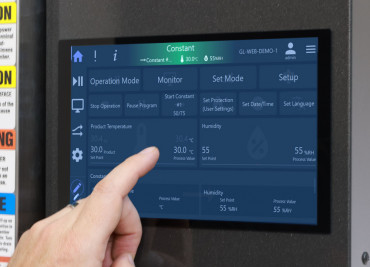
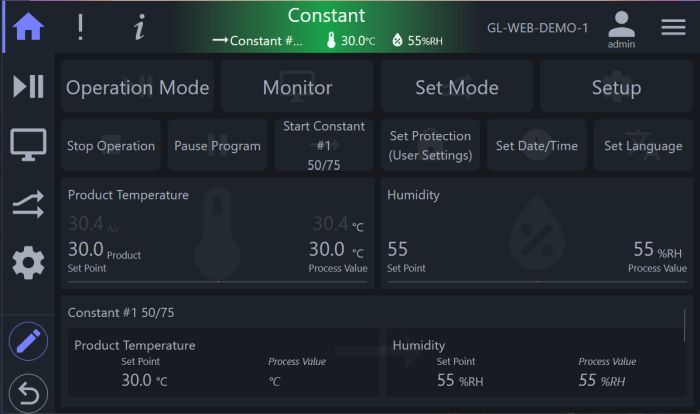
Experience the next level of testing flexibility and functionality with the new GL Controller System. Building on 35 years of engineering success, the GL controller offers advanced chamber operation, intuitive controls, and expanded capabilities for today's testing environments.
The user interface features simplified navigation for quick access to any function, and remote network operation allows you to monitor and control your chamber from anywhere on your network via a standard browser.
Virtually Unlimited Programs: Store virtually unlimited test profiles that can be downloaded via browser or USB. Easily share programs with other chambers for accurate and repeatable testing.
Comprehensive Data Logging: Log over 30 operational parameters. Downloads to a server or PC can be automated for efficient data management.
Multilingual Support: The display supports English, Spanish, or French, making it accessible to a wider range of operators.
Maintenance and Diagnostics: Use programmable timers to set reminders for maintenance or other actions. Advanced diagnostics, a complete history log, and a 'back trace' feature simplify troubleshooting.
Web Controller functionality: Our Web Controller tool is built-in, used for remote monitoring, programming, and data logging. The flexible user interface is suited for all devices, from phones to large monitors.
API and Macros: Macros allow you to set alerts or updates to email or other devices, or change chamber operation. The RestFUL API allows direct access and interaction with other software and devices.
Command Protocol Access: Direct access to GL command protocols via the ethernet, enabling custom programming and integration with other test equipment. Options for RS-232 and RS-485 serial interfaces are also available.
| Specification | Features |
|---|---|
| Display |
Color touch-screen, 10-inch diagonal |
| Control Method |
PID (Proportional, Integral, Derivative) |
| Communications |
Remote access: Ethernet via browser, RestFUL API, or direct Note: ESPEC Azure is the default email communication protocol. Customers can use SMTP (as alternative email protocol) if they subscribe to the service. |
| Operating Modes |
STOP: chamber off, programmer on |
| Programming Capabilities |
Max 500 steps per test profile; test profiles can be chained for >500 steps. |
| Data Storage |
Maximum data log file size is 1GB |
| Additional Functions |
Alarm report lists alarm and time occurred (also datalogged) |
| Remote Ethernet Operation |
Full functionality of the mounted display |
| Firmware maintenance |
Firmware updates available via cloud service. One year updates are included. |
|
| Function | Interface | Notes | Link |
|---|---|---|---|
|
Remote user access via browser |
Ethernet |
|
GL Chamber Controller *Live Demo* |
| RESTful API | Ethernet | RESTful API for access from other software. Documentation includes examples in Javascript, Python, CURL. | Log into this demo (demo/demo), then go to API Documentation |
|
Direct system controller commands |
Ethernet or optional RS-232 or RS-485 |
Use direct controller commands. Bypasses the API and UI, talks directly to the PLC. Library in Python 3. |
|
|
Labview drivers |
RS-232 |
Direct controller commands for VISA 5.0+ |
Labview drivers at ni.com (link) |
Detailed guide on remote/software access (pdf)
Yes. Every GL Controller includes ESPEC's browser-based Web Controller, allowing users to remotely monitor chamber status, create and edit test profiles, download data logs in CSV format, configure email alarm notifications, and integrate with third-party software using a RESTful API. No additional software is required to access these features through a supported web browser.
Yes. The GL Controller makes it easy to export chamber data in industry-standard CSV format for analysis, reporting, and recordkeeping. Data can be downloaded directly to a USB flash drive at the chamber or through the browser interface to your local computer.
Yes. Test programs can be uploaded to or downloaded from the GL Controller using a USB flash drive. Program files are stored in JSON format, making it simple to back up configurations, duplicate programs across chambers, or archive test methods.
Yes. A standard USB port is included on every GL Controller. It supports exporting chamber data logs, importing and exporting test programs, and simplifying routine data management without requiring a network connection.
Yes. The GL Controller is designed for integration with laboratory software, custom applications, and automation systems. It includes a RESTful API for modern software integration and supports direct communications through optional RS-232 or RS-485 interfaces.
Yes. ESPEC provides the free Chamber Connect Library, which includes sample code and documentation to help developers build custom applications that communicate with the GL Controller over Ethernet or optional RS-232/RS-485 connections. Download at Github.
The GL Controller supports multiple communication methods to fit a variety of laboratory and manufacturing environments, including Ethernet, USB, optional RS-232, optional RS-485, a browser-based Web Controller, and a RESTful API for software integration.
Yes. The GL Controller is designed for seamless integration with laboratory information systems (LIMS), manufacturing execution systems (MES), SCADA platforms, and custom software. Developers can use the built-in RESTful API or the Chamber Connect Library to automate chamber control, retrieve test data, and integrate environmental testing into existing workflows.
General requests sent from this page will be routed to the best party in our organization to help you. Please complete all fields to ensure a fast response.
ESPEC North America, Inc. (Corporate office)